

How to export a gantt
There are two ways you can export the gantt in ProofHub.
\
-
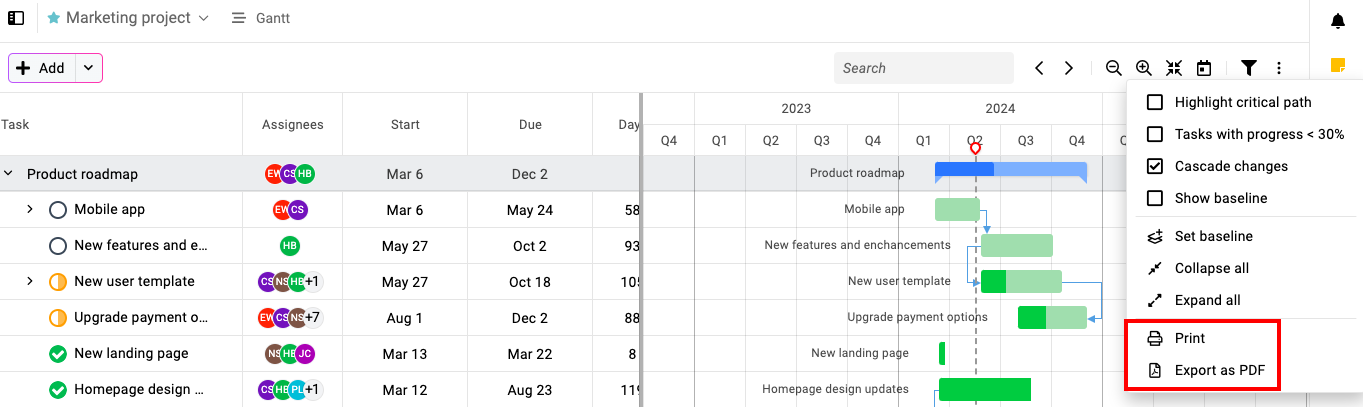
Click on the three dots icon at the top-right of the page.
-
Select “Print” to print the gantt chart.
-
Or else, download the gantt chart in PDF format by choosing the “Export as PDF” option.
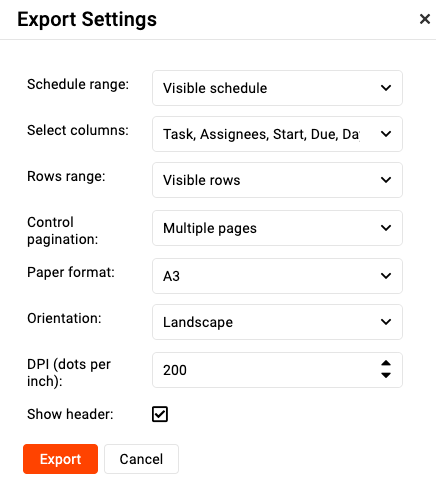
**Note:** **If you can’t fit the gantt chart on one screen while exporting/printing, then try changing the settings as follows:
-
*Change the DPI to “*200“
-
*Select the orientation to “*Landscape“
-
Select the paper format to “A3“
\
Last updated today
Built with Documentation.AI